Both families, one guest list
Your partner and each side’s family manage their own guests, and you see everything.
The bride’s mother knows her side’s guests. His uncle knows his. Mandap lets each of them log in and manage only their own side, while the couple sees the whole wedding.
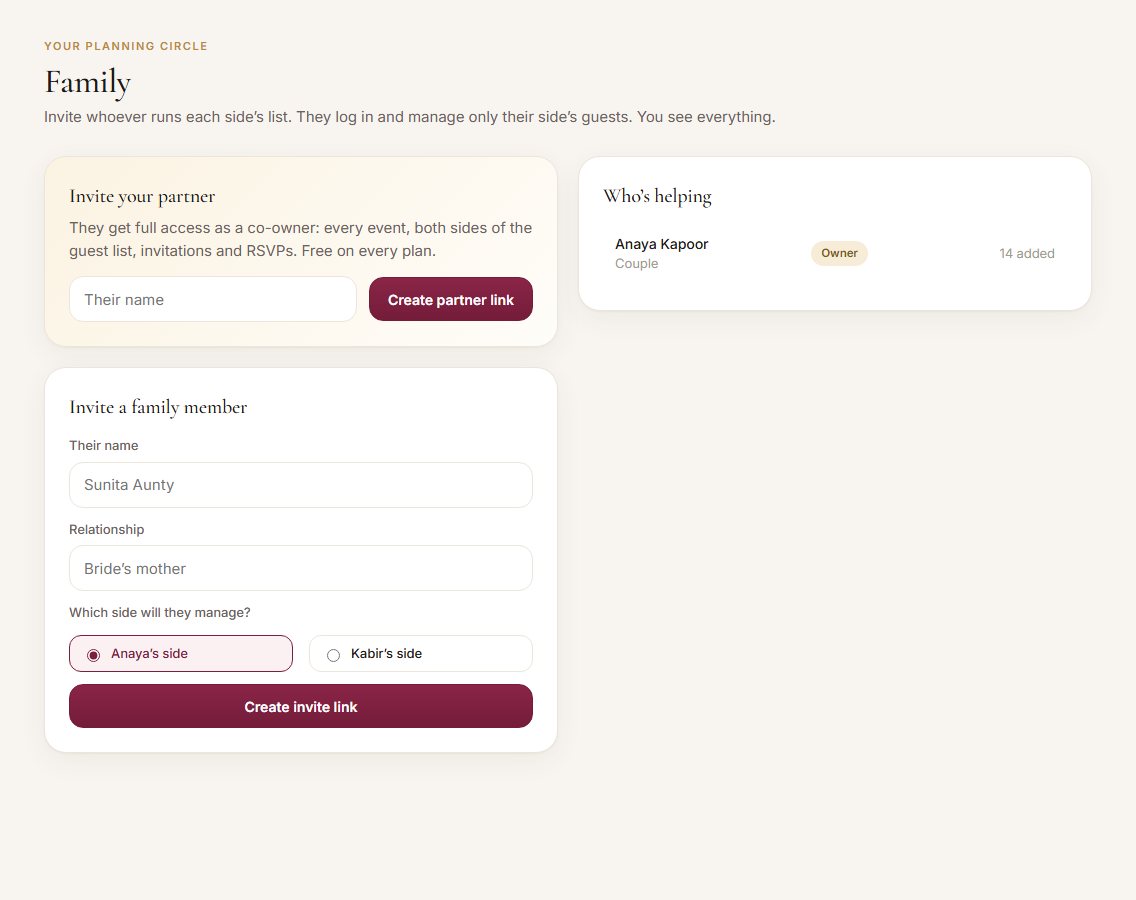
What it does
- Lets you invite your partner as a co-owner with full access, free on every plan.
- Lets you invite family members to manage the bride’s side or the groom’s side.
- Shows family members only their own side’s guests, so lists stay tidy and private.
- Tags every guest with a side automatically, based on who added them.
- Shows who added how many guests.
What it records
Every field you’ll see, and what it means.
How it works
- 1Invite your partner
Family → Invite your partner. Share the link on WhatsApp. They join as a co-owner.
- 2Invite each side
Choose the bride’s or groom’s side, add the person’s name and relationship, and share the link.
- 3They sign up once
Family members create a login and land on their side’s guest list.
- 4Everyone adds their guests
Each guest is tagged to the right side automatically, and you see the totals for both.
How it helps you
The people who know the guests add them directly.
Everything lands in one list, already split by side.
Clear numbers per side make it easy to agree on limits.
For example
Questions
Can family members see the other side?
No. Family members only see and edit their own side. The couple sees everything.
Is inviting my partner free?
Yes, on every plan. Family members for each side come with the Signature plan.
Can I move a guest to the other side?
Yes. Click the side tag on their row and pick the other side.
Ready to try it?
Set up your wedding in two minutes. It’s free to start.